FAQs
Find answers to common questions about the Alpha Flight Controls and Alpha Flight Controls XPC, including compatibility, features, setup, and usage.
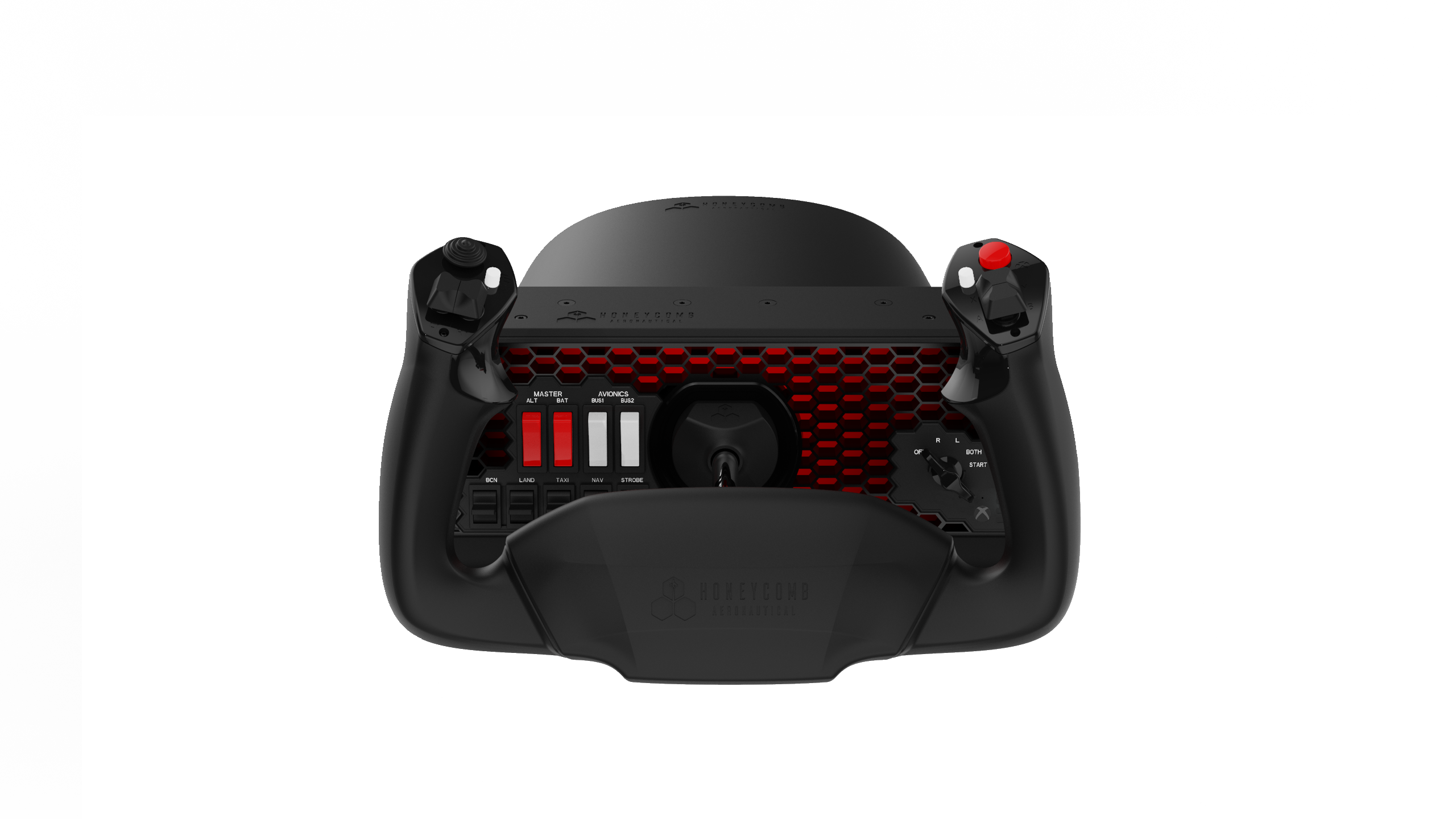
What are the Alpha Flight Controls and Alpha Flight Controls XPC?
The Alpha Flight Controls and Alpha Flight Controls XPC are realistic flight simulation yoke systems designed to provide precise aircraft control for home flight simulation.
Both products feature a full 180-degree yoke rotation, smooth self-centering movement, and an integrated switch panel for common cockpit functions.
What is the difference between the Alpha Flight Controls and Alpha Flight Controls XPC?
The Alpha Flight Controls are designed for PC and Mac flight simulation.
The Alpha Flight Controls XPC expand compatibility with support for Xbox when used with supported Honeycomb hardware and the Honeycomb Xbox Hub.
Who are the Alpha Flight Controls designed for?
The Alpha Flight Controls are ideal for:
- Sim pilots who want a realistic yoke-based control setup
- Users flying general aviation, business aircraft, or airliners
- Flight simulation beginners looking for a more immersive experience
- Experienced simmers building a dedicated cockpit setup
- Users who want integrated switches and programmable controls
What simulators are the Alpha Flight Controls compatible with?
The Alpha Flight Controls are compatible with major flight simulation platforms, including:
- Microsoft Flight Simulator
- X-Plane 11 and 12
- Prepar3D
Compatibility is only guaranteed for supported flight simulators. Other titles may not work as expected.
Do the Alpha Flight Controls work on Xbox or console?
The standard Alpha Flight Controls are designed for PC and Mac.
The Alpha Flight Controls XPC support Xbox Series X|S and Xbox One. Additional Honeycomb hardware such as the Bravo Throttle Quadrant and Charlie Rudder Pedals require the Honeycomb Xbox Hub when used on Xbox consoles.
The Honeycomb Xbox Hub is required to connect additional compatible Honeycomb hardware to the Alpha Flight Controls XPC on Xbox Series X|S.
Learn more here:
https://flyhoneycomb.com/collections/xbox-compatibility
What platforms do the Alpha Flight Controls support?
The Alpha Flight Controls support:
- PC with Windows
- Mac
The Alpha Flight Controls XPC support:
- PC with Windows
- Mac
- Xbox Series X|S
- Xbox One
Full compatibility depends on simulator and platform support.
What controls are included on the Alpha Flight Controls?
The Alpha Flight Controls include:
- 180-degree yoke rotation for aileron control
- Pitch control with smooth self-centering movement
- Integrated switch panel
- Master, alternator, avionics, and light switches
- Five-position ignition switch
- Left and right yoke handle controls
- Programmable buttons and switches
- Push-to-talk button
What makes the Alpha Flight Controls unique?
The Alpha Flight Controls combine a realistic yoke feel with an integrated switch panel, giving users a more complete cockpit experience without requiring multiple separate devices.
Key differentiators include:
- Full 180-degree yoke rotation
- Smooth self-centering mechanism
- Minimal center dead zone
- Hall-effect sensors for long-term accuracy
- Integrated aircraft switch panel
- Programmable controls for flexible simulator setups
Can I customize the controls?
Yes. Users can customize the Alpha Flight Controls within supported simulators.
Common customization options include:
- Reassigning buttons
- Adjusting pitch and roll sensitivity
- Setting dead zones
- Mapping switches to simulator commands
- Creating aircraft-specific profiles
Do I need rudder pedals to use the Alpha Flight Controls?
Rudder pedals are recommended for the most realistic flying experience, but they are not required to use the Alpha Flight Controls.
Some simulators allow rudder or steering functions to be assigned to other controls if pedals are not available.
Can I use the Alpha Flight Controls with the Bravo Throttle Quadrant?
Yes. The Alpha Flight Controls pair well with the Bravo Throttle Quadrant for a more complete flight simulation setup.
Together, they provide yoke, switch panel, throttle, autopilot, annunciator, and landing gear functionality depending on simulator support.
Can I use the Alpha Flight Controls XPC with other Honeycomb products on Xbox?
Yes. The Alpha Flight Controls XPC can be used with compatible Honeycomb hardware on Xbox when connected through the Honeycomb Xbox Hub.
The Xbox Hub allows supported devices such as the Bravo Throttle Quadrant and Charlie Rudder Pedals to function together as a complete Honeycomb ecosystem on Xbox Series X|S.
What comes in the box?
The Alpha Flight Controls package typically includes:
- Alpha Flight Controls or Alpha Flight Controls XPC unit
- Mounting hardware
- USB cable
- Quick start documentation
Box contents may vary by product version or region.
Are the Alpha Flight Controls suitable for beginners?
Yes. The Alpha Flight Controls are suitable for beginners while still offering the precision and depth experienced sim pilots expect.
They are especially helpful for users who want to move beyond a keyboard, mouse, or gamepad setup.
Are the Alpha Flight Controls portable?
The Alpha Flight Controls can be moved between setups, but they are primarily designed as a desktop-mounted flight simulation control system.
For best results, mount the unit securely to a desk or sim setup before use.
Will there be updates or profiles available?
Yes. Honeycomb provides profiles, software, and support resources to help users configure their hardware with supported simulators.
Where should I start if I am setting up the Alpha Flight Controls for the first time?
Start by:
- Connecting the Alpha Flight Controls directly to your computer or supported platform
- Confirming the device is detected by your system
- Launching your simulator
- Checking the control settings
- Verifying pitch, roll, buttons, and switches
- Adjusting sensitivity and dead zones as needed
For best results, connect the Alpha Flight Controls before launching your simulator.